PROGRAMMING PROTECTION · BASIC / FIELD-MODE
Programming Protection Token Basic for BMW E-Sys
Send the original JSON request from the Programming Protection Basic (Field-Mode) row in E-Sys. After successful processing, receive a complete JSON response for the same workflow.
Open the bot → /start → English → Programming Protection Token. Send the E-Sys JSON request and follow the bot instructions.
Open Telegram botHow to use PPT Basic in E-Sys
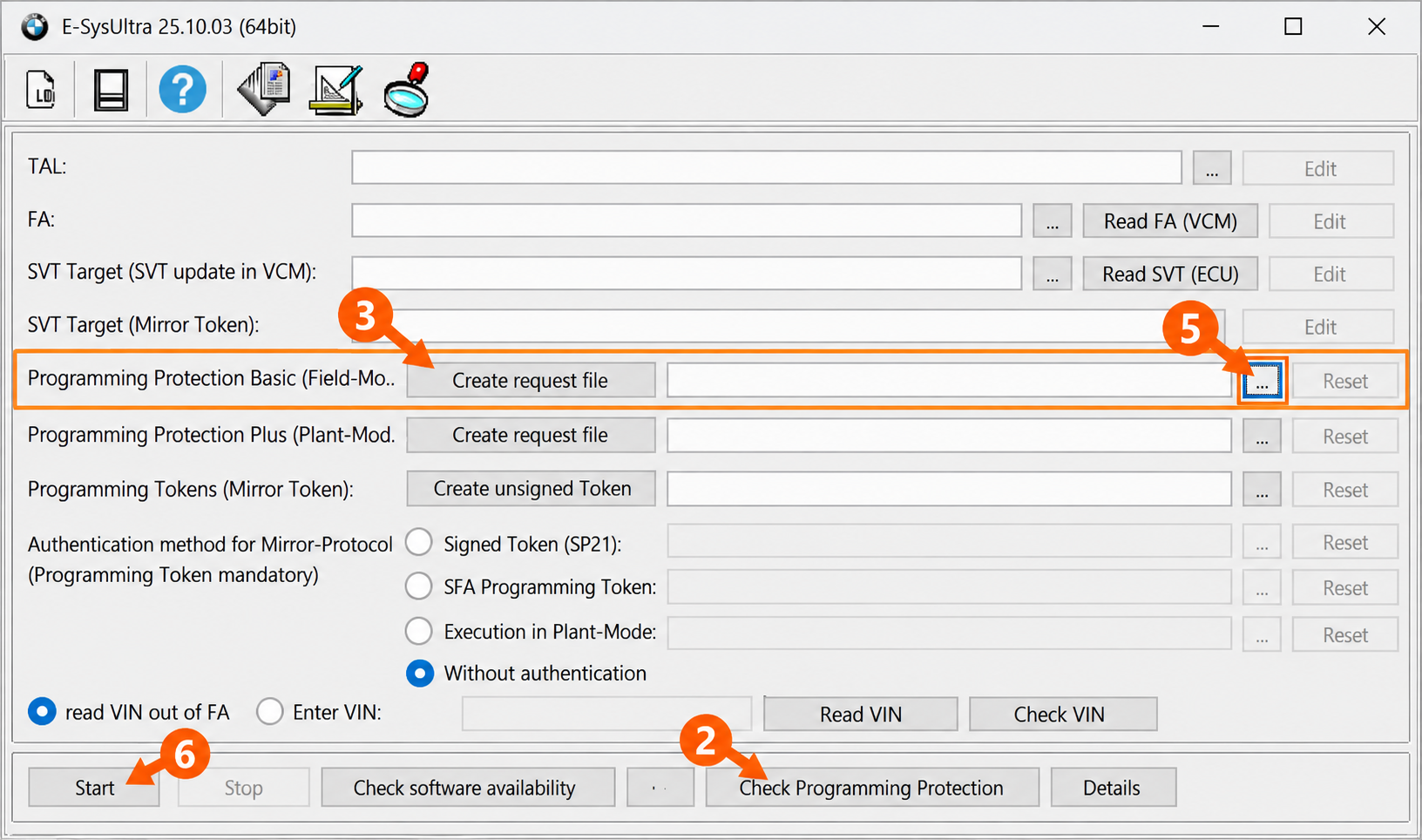
- Open Expert Mode → TAL-Processing. Prepare the current TAL, matching SVT and vehicle VIN.
- Press Check Programming Protection.
- In the Basic (Field-Mode) row, press Create request file and save the JSON.
- Choose English → Programming Protection Token in the bot. Send your JSON request and receive the JSON response.
- In the same Basic row, use … to select the returned JSON response.
- When the TAL is ready, press Start. The token is checked when the TAL starts.
The response belongs to the original request. Receiving it does not confirm a successful TAL or a write to an ECU. Support for every vehicle, E-Sys version and TAL is not claimed; check applicability with support if uncertain.
Telegram Stars and your bot balance
Stars payments in the bot top up your bot balance. Each PPT request requires 1,500 Stars from that balance. The bot reserves the amount before processing and charges it after a successful response is saved. If processing fails before a result is ready, the reservation is released.
If your bot balance is insufficient, follow the top-up instructions and then confirm the pending request in the bot. Buying Stars separately does not itself top up your balance in this service bot.
Every new JSON upload, including the same file again, creates a new request. Use the existing result button to receive a ready file again without creating another request.
Before ordering PPT Basic
Is a VIN enough?
No. Use the original E-Sys JSON request generated from the current TAL/SVT. The supported Basic request contains one VIN request, Feature 0x006880 and SWEData. A VIN or screenshot cannot replace the file.
Is this an ISTA, Plus, Mirror or Launcher token?
No. This service is for Programming Protection Basic (Field-Mode). Plus and Mirror use different workflows. ISTA Diagnostic Token is a separate diagnostic service; SFA is a separate factory feature service. An EST / E-Sys Launcher token is also a different product.
What file will I receive?
After successful processing, the bot sends a separate .json response containing the token. Select it with … in the same Basic row in E-Sys. Keep it with the original request for that workflow.
When are the 1,500 Stars charged?
The bot reserves 1,500 Stars from your bot balance for the request and charges them after the successful response is saved. If processing fails before the result, the reservation is released. Follow the bot status and support instructions if the outcome is unclear.
What if the connection is lost or the result is unclear?
Check the existing operation in the bot and contact support before sending the file again. A new upload creates a new order, even for an identical JSON file. A ready result can be delivered again with its existing result button.
Does the JSON response prove successful programming?
No. It is a response for the Basic row in E-Sys. TAL execution, compatibility with the specific vehicle and ECU writes must be checked in your own workflow.
Order conditions
Orders follow the bot instructions and the Terms of Use. Questions about input or delivery can be sent to support. Refund requests are reviewed under the Refund Policy.
Availability of Telegram Stars and top-up methods depends on your location and payment provider. Payment from every country or with every card is not guaranteed.